What Is a Hot-Swap Keyboard (and Is It Worth It)?
A hot-swap keyboard has switch sockets on its circuit board instead of soldered joints, so you can pull switches out and press new ones in by hand — changing the entire feel of the board, or fixing a dead key, in minutes with a switch puller instead of a soldering iron. The one spec to check is the socket type: a 5-pin socket accepts both 3-pin and 5-pin switches, while a 3-pin socket needs 5-pin switches to have their two plastic legs clipped. For most first-time buyers, hot-swap is worth it — it turns a wrong switch guess from a dead board into an inexpensive switch-pack experiment. It's reasonable to skip only if you already know your switch and will never change it.
The one thing to know: the pin count that matters is on the socket, not just the switch. 5-pin sockets take everything; 3-pin sockets need 5-pin switches clipped. And all standard hot-swap sockets are MX-footprint — low-profile and optical switches are separate, non-interchangeable ecosystems.
What does "hot-swap" actually mean?
On a traditional mechanical keyboard, every switch's two metal pins are soldered to the printed circuit board (PCB). Changing switches means desoldering roughly a hundred joints — a soldering iron, a solder sucker, and hours of careful work with real risk of damaging the PCB.
A hot-swap keyboard replaces each pair of solder joints with a small spring-clip socket mounted on the back of the PCB. The switch's metal pins press into the socket's contacts and are held by friction. To change a switch: pull the keycap off with a keycap puller, grip the switch with a switch puller (both tools ship in the box with most hot-swap boards), squeeze the top and bottom retention clips, pull the switch straight out, and press the new one straight in until it seats flush. A full board swap takes well under an hour; a single dead switch takes about a minute.
3-pin vs 5-pin: the decoder
Every MX-style switch has two metal contact pins and a large round center post. The difference between the two variants is two extra pieces of plastic:
- 3-pin (plate-mount) — center post + two metal pins. Designed for boards where a metal or plastic plate holds the switch steady.
- 5-pin (PCB-mount) — the same three, plus two extra plastic alignment legs that stabilize the switch directly against the PCB.
The compatibility rule runs one direction, and it's about the socket holes in the PCB:
- A 5-pin socket accepts both 3-pin and 5-pin switches — the extra leg holes simply go unused by a 3-pin switch. This is why 5-pin hot-swap is the spec to look for.
- A 3-pin socket has no holes for the plastic legs. To fit a 5-pin switch, you must clip the two plastic legs off with flush cutters. It works fine — the legs are only alignment plastic, not electrical — but it's a one-way modification and an easy gotcha to hit after ordering 90 switches.
Which switches fit? The MX-footprint rule
The sockets themselves come from a handful of manufacturers — Kailh (the most common), Gateron, and Outemu — and in practice they all grip standard MX-style pins. Outemu sockets on some budget boards are the tight outlier historically noted for fussier fit with some third-party switches, but the working rule is: if a switch is a standard MX-footprint switch — Cherry MX, Gateron, Kailh, Akko, and the enormous aftermarket around them — it fits a standard hot-swap socket.
What does not fit, ever:
- Low-profile switches (e.g. Gateron Low Profile, as used in boards like the NuPhy Air75) — a physically different, shorter footprint. A low-profile hot-swap board only takes low-profile switches, and vice versa.
- Optical and Hall-effect switches (e.g. Razer's optical switches) — they register a keypress by light or magnetic sensor rather than metal contact, so even when they're removable, they only fit that brand's own boards.
So "hot-swap" isn't one universal ecosystem — it's hot-swap within a footprint. Standard MX hot-swap has by far the largest switch aftermarket; low-profile and optical hot-swap lock you to a much smaller catalog.
How durable are hot-swap sockets, honestly?
Socket manufacturers typically rate hot-swap sockets for around 100 insertion cycles — a manufacturer figure, and in practice many sockets outlive it. But 100 cycles per socket is a lot: even a committed switch tinkerer rarely swaps any one key more than a handful of times.
The real failure mode isn't wear-out — it's a bent pin forced into a socket. Switch pins arrive slightly bent surprisingly often, and pressing a bent pin in can fold it flat, jam the socket, or — worst case — push the socket's solder pads off the PCB. That last one converts a two-minute swap into a board repair. Which is why technique matters:
- Inspect both pins before every insertion; straighten any bend gently with tweezers or flat pliers.
- Support the PCB from underneath, directly beneath the socket you're pressing into — with a finger if the board is open, or trust the case's internal support on a fully assembled board that doesn't flex.
- Press straight down, switch aligned squarely, until it clicks flush with the plate.
- Never force it. Meaningful resistance means a bent pin or misalignment — back out and look.
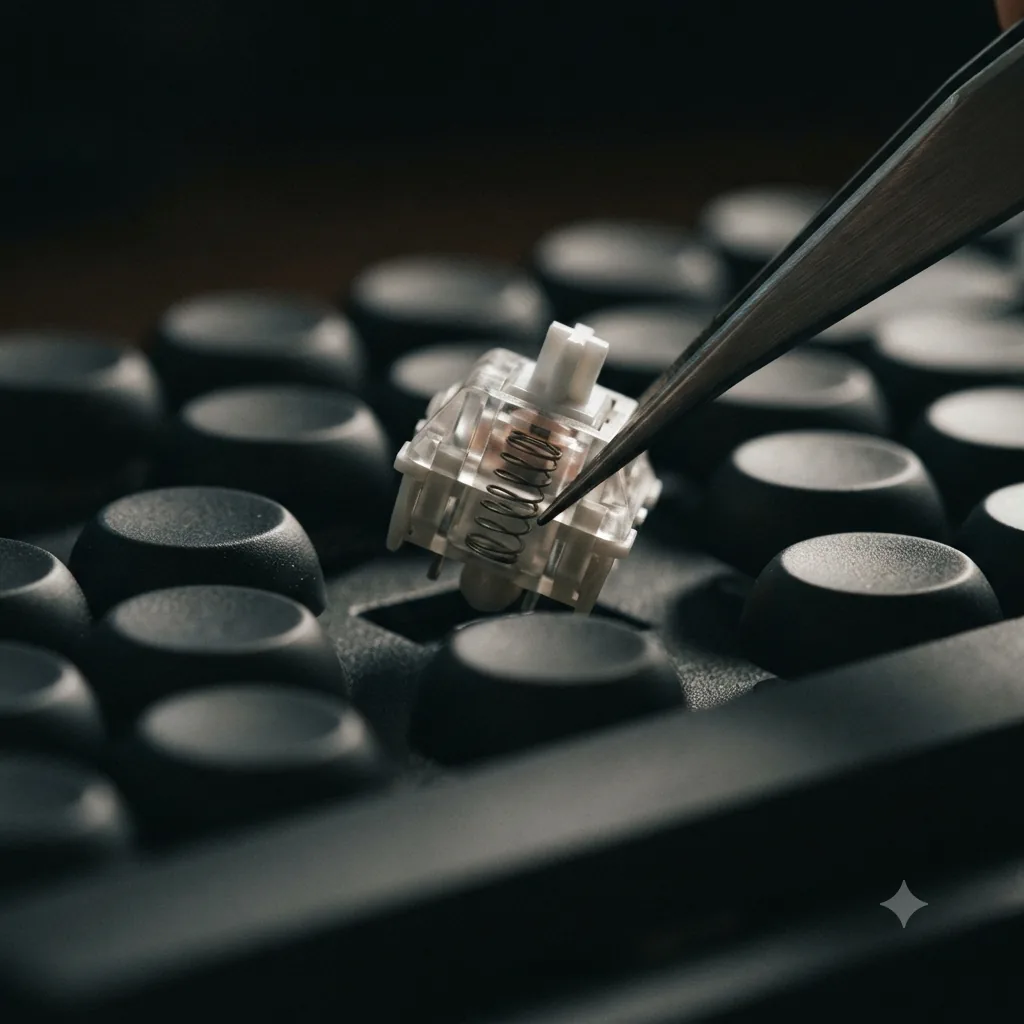
Why hot-swap is the real future-proofing
Switch feel — linear vs tactile vs clicky, 45g vs 60g — is a personal preference you cannot reliably predict from reviews. Plenty of buyers order the internet's favorite switch and discover their own fingers disagree. On a soldered board, that's the end of the story: live with it or buy another keyboard.
On a hot-swap board, a wrong guess costs an inexpensive switch pack and an evening. You can also fix a single failed switch in a minute, chase a different sound signature years later, or resell the board with fresh switches. That flexibility — not RGB, not polling rate — is the spec that keeps a keyboard relevant as your preferences evolve, which is why we weight it heavily in our rankings.
Who can reasonably skip hot-swap?
- Settled-preference typists — if you've typed on MX Browns (or any specific switch) for years, know you're happy, and have zero tinkering itch, a soldered board with that switch loses you nothing in practice.
- Low-profile buyers — the low-profile switch catalog is small enough that hot-swap adds less optionality; you're partly locked to the ecosystem either way (though boards like the NuPhy Air75 V2 offer low-profile hot-swap if you want it).
- Sealed-appliance office buyers — if what you actually want is battery life, multi-device wireless, and quiet, a non-swappable board like the Logitech MX Mechanical is a legitimate choice, bought with eyes open that it's an appliance, not a platform.
Which of our picks are hot-swap?
- Keychron V-series (V1/V6) — yes, 5-pin sockets (the flexible kind). Note the budget C3 Pro is not hot-swappable — check the exact model.
- Keychron K8 Pro — yes, hot-swap plus wireless and QMK/VIA.
- RK Royal Kludge RK84 — yes, and its PCB takes both 3- and 5-pin switches.
- EPOMAKER TH80 Pro — yes, 5-pin.
- NuPhy Air75 V2 — yes, but low-profile hot-swap only — standard MX switches do not fit.
- Logitech MX Mechanical — no. It's a sealed productivity board; we recommend it anyway for the office role, but not as a platform to modify.
- Razer Huntsman V3 Pro — its optical switches are not standard MX hot-swap; you're locked to Razer's switches.
Full spec comparison on the best mechanical keyboards page.
Frequently Asked Questions
A hot-swap keyboard has switch sockets on its circuit board instead of soldered joints. You pull a switch out with a switch puller and press a new one in by hand — no soldering iron, no disassembly beyond removing the keycap. Changing the feel of the whole board, or replacing a single dead switch, takes minutes instead of an afternoon of desoldering.
Both have the same two metal contact pins and a center post; a 5-pin (PCB-mount) switch adds two extra plastic alignment legs for stability on boards without a plate. A 3-pin (plate-mount) switch omits those legs. The key rule is about the SOCKET: a 5-pin socket accepts both 3-pin and 5-pin switches, while a 3-pin socket only accepts 5-pin switches after you clip off the two plastic legs with flush cutters.
No. Standard hot-swap sockets fit the MX footprint — Cherry MX and MX-style switches from Gateron, Kailh, Akko, and many others. Low-profile switches (such as Gateron Low Profile) and brand-specific optical or Hall-effect switches use different footprints and are not interchangeable with MX sockets. A low-profile hot-swap board only takes low-profile switches, and an optical board only takes that brand's optical switches.
Socket makers such as Kailh typically rate their hot-swap sockets for around 100 insertion cycles. That is a manufacturer figure, not a hard cliff — many sockets survive more — but the practical failure mode is rarely wear-out. It is a bent switch pin forced into the socket, which can push the socket loose from the circuit board. Careful insertion matters more than the cycle rating.
Check that both metal pins are straight before inserting (gently straighten bent pins with tweezers), support the circuit board from underneath directly beneath the socket, align the switch squarely, and press straight down until it clicks flush. Never force a switch that resists — pull it back out and check the pins. Pressing into an unsupported PCB is how sockets get cracked or torn off.
For most first-time mechanical keyboard buyers, yes — you cannot reliably guess your switch preference from reviews, and hot-swap turns a wrong guess into an inexpensive switch-pack experiment instead of a dead end. You can reasonably skip it if you already know you are happy with a specific switch and will never change it, or if you are buying into a low-profile or optical ecosystem where your switch options are limited by the platform anyway.